Looking for something?


Archive for the ‘Self-Managed Apps Program’ Category

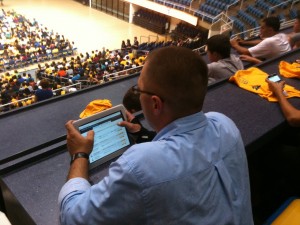
Here are a couple of pics from West Virginia University’s Student welcome yesterday. 4,500 students attended with over 1,200 text messages and 150 Twitter messages sent to the giant Jumbotrons and two displays mounted on either side of the stage, all powered by LocaModa. The whole event was being moderated in real time on an iPad using the LocaModa TJ tool.

LocaModa's Wiffiti at WVU

LocaModa's Text Jocky moderation tool being used at WVU

  • Share/Bookmark

Picture 8We receive hundreds of emails asking about customizing your Wiffiti ‘loca’…

Before I go any further, let’s spin back a bit – What’s a loca?
A ‘loca’ is our standard routing system that allows your text message to go to a specific Wiffiti screen.

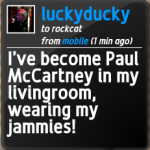
For example, if you’d like to text the world your thoughts on Rock Band, and you happen to find the screen below enchanting, you would send a message to 87884 (this is our shortcode, which you would treat just like any other phone number) in the form:

@rockcat I’ve become Paul McCartney in my livingroom wearing my jammies!
In this case, @rockcat is the loca. If you use Twitter, Facebook, or any of a list of other social services (especially those in the location-based arena), this convention should seem pretty standard.

Get Adobe Flash player

On Wiffiti.com, screens are assigned a default loca (e.g. @wif5467). If you’d like a custom loca (e.g. @mrjones for a classroom screen), we’re happy to offer a Self-Managed Apps Program that will allow you a custom loca (and lots of other advanced features) at a deep discount from our standard commercial offerings.
Just contact us if you’d like to get involved!

  • Share/Bookmark

We get many emails from users asking how to get rid of unwanted web or mobile messages on their Wiffiti screens. I’ve grabbed a few screenshots from the “I Love Trash” screen to demonstrate how easy it is!

First, click on My Screens in the top righthand corner of wiffiti.com.
Next, go to the timeline view of the screen.
timeline view

(Note: You can also find a link to the timeline in the top right of individual screen pages).

All web-submitted and mobile messages/photos will have a small blue “X” in the righthand side of their call-out box.
oscar message
Go ahead… Click that.
Vamoooose!

Oh, the power.

A few notes:
1. Only web-submitted and mobile messages can be deleted. Twitter and flickr messages (if you choose to integrate tagged content) cannot be deleted by the user… so choose your tags wisely!
2. You can set your screen rating (G, R). Using wiffiti.com, messages can only be deleted after they are delivered to the screen.
3. Screen owners can delete messages on his/her screens ONLY. You cannot delete a message on a screen you did not create.
3. For advanced moderation options, contact us about our Self-Managed Apps Program.

  • Share/Bookmark

We’ve had a lot of interest lately from Wiffiti users who are looking for advanced features, more customization, and professional moderation. So, in addition to personal responses (always feel free to contact us directly), I wanted to address some of those issues here as well. Keep an eye on the blog for user questions as they come in.

Most of the LocaModa Feature posts on this blog capture the work we’re doing for major agencies and brands, with massive displays and custom cross-channel integration work. But don’t be put off if you’re a nonprofit or smaller network looking to integrate our services! We’re currently running a Self-Managed Apps Program which offers a menu of advanced features catered to smaller organizations like schools and churches.

We’re also always open to feedback from smaller organizations that have found success using Wiffiti. We’re always adding new features to our roadmap based on your ideas, so keep them coming. For example, after hearing that you’d like a “reveal” feature to showcase the Wiffiti background images at timed intervals, we got to work on integrating this into our custom feature set. We’re also plugging away at a bundle of new options for custom photo display, coming soon to the advanced features list!

  • Share/Bookmark